Open and click tracking
Tracking is configured per sending domain, on that domain's page.
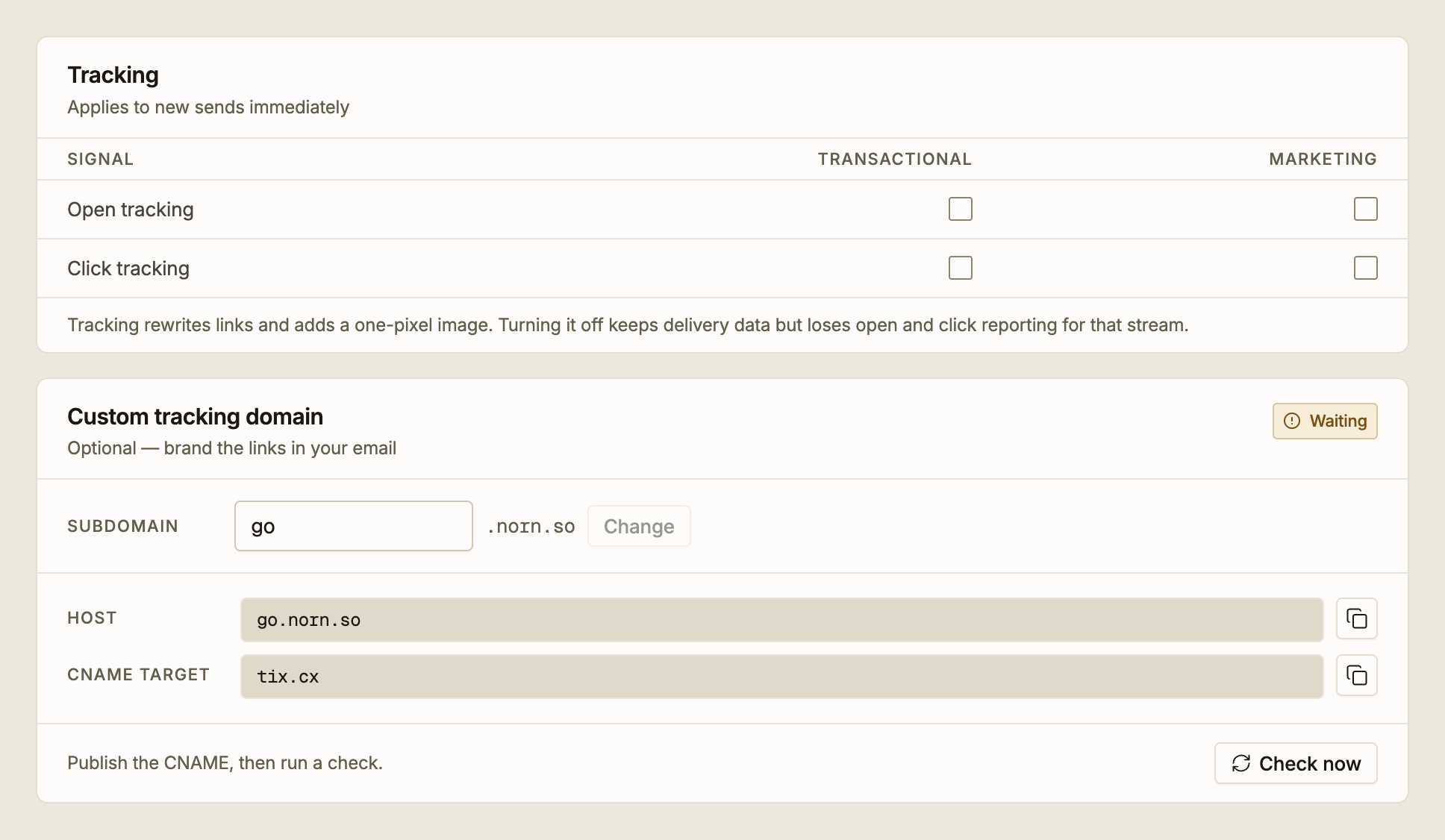
What each one does
Open tracking adds a one-pixel image to the message. When a mail client loads that image, Epostix records an open.
Click tracking rewrites the links in the message so they pass through Epostix first, which records the click and then redirects to your original destination.
Both are off until you turn them on, and each can be set independently for transactional and marketing mail. That split matters: a receipt does not need its links rewritten, while a newsletter you are measuring does.
Changes apply to new sends immediately. They are not retroactive. Turning tracking on does not produce data for mail you already sent, and turning it off does not remove data you already collected.
Turning tracking off keeps all delivery reporting for that stream. You still see sent, delivered, bounced and failed; you lose only opens and clicks.
What tracking costs you
Rewriting links and embedding an image are not free of consequences, and it is worth choosing deliberately rather than enabling both everywhere.
- A rewritten link is not your URL. Recipients who hover over it see the tracking host, and a small number of security tools treat redirects with more suspicion than direct links.
- An embedded image is a reason for a mail client to ask whether to load remote content.
- Opens are the least reliable signal Epostix reports. See how far to trust an open. Clicks can be a stronger signal, but security scanners also follow links automatically.
For transactional mail, click tracking off and open tracking off is a defensible default: you already know whether the message was delivered, and that is usually the question that matters for a password reset.
Branding tracked links
By default, rewritten links use an Epostix hostname. A recipient who inspects a link sees a domain that is not yours.
A custom tracking domain replaces that with a subdomain of your own, so links read as
go.norn.so rather than a shared host. It is optional, and it only affects click tracking.
To set one up:
- On the domain's page, open Custom tracking domain and choose a subdomain.
linksis the default;goandclickare common alternatives. - Epostix gives you a host and a CNAME target. Publish that single CNAME in your DNS, alongside the records from DNS records explained.
- Run Check now. The panel reads Waiting until the CNAME resolves, then Verified.
Changing the subdomain later is a breaking change. The old hostname is torn down and verification restarts from scratch, so every tracked link in mail you have already sent stops resolving. Pick the subdomain before you start sending, and treat a later change the way you would treat retiring a URL.
The CNAME must resolve directly to us, not through a proxy. On Cloudflare, set the record to DNS only. A proxied host prevents the certificate being issued for it.
Where the data appears
Opens and clicks show up as the Opened and Clicked statuses in Activity, as events on each message's timeline, and as the open rate on Overview, which is measured against delivered mail, not against everything sent.