Inbound mail
Inbound is a record of the mail your domains received. Every message is scored for spam on the way in, stored, and kept so you can read it here.
What arrives here
Mail is accepted for any address at a domain you have added to the workspace. There are no
mailboxes to create and no addresses to register first: support@, billing@ and anything
else at that domain are all accepted.
Whether mail reaches Epostix at all is a question of where your domain's MX records point. That is not managed from this screen.
A bounce for mail you sent does not appear here. Bounce notifications are recognised by the address they come back to and are recorded as bounces instead. Look for them in Activity and on the bounce rate page, not on this screen.
Mail that arrives here also raises an email.received webhook,
once, at the moment it arrives. Messages the filter rejected, quarantined or discarded are
stored but not announced.
The list
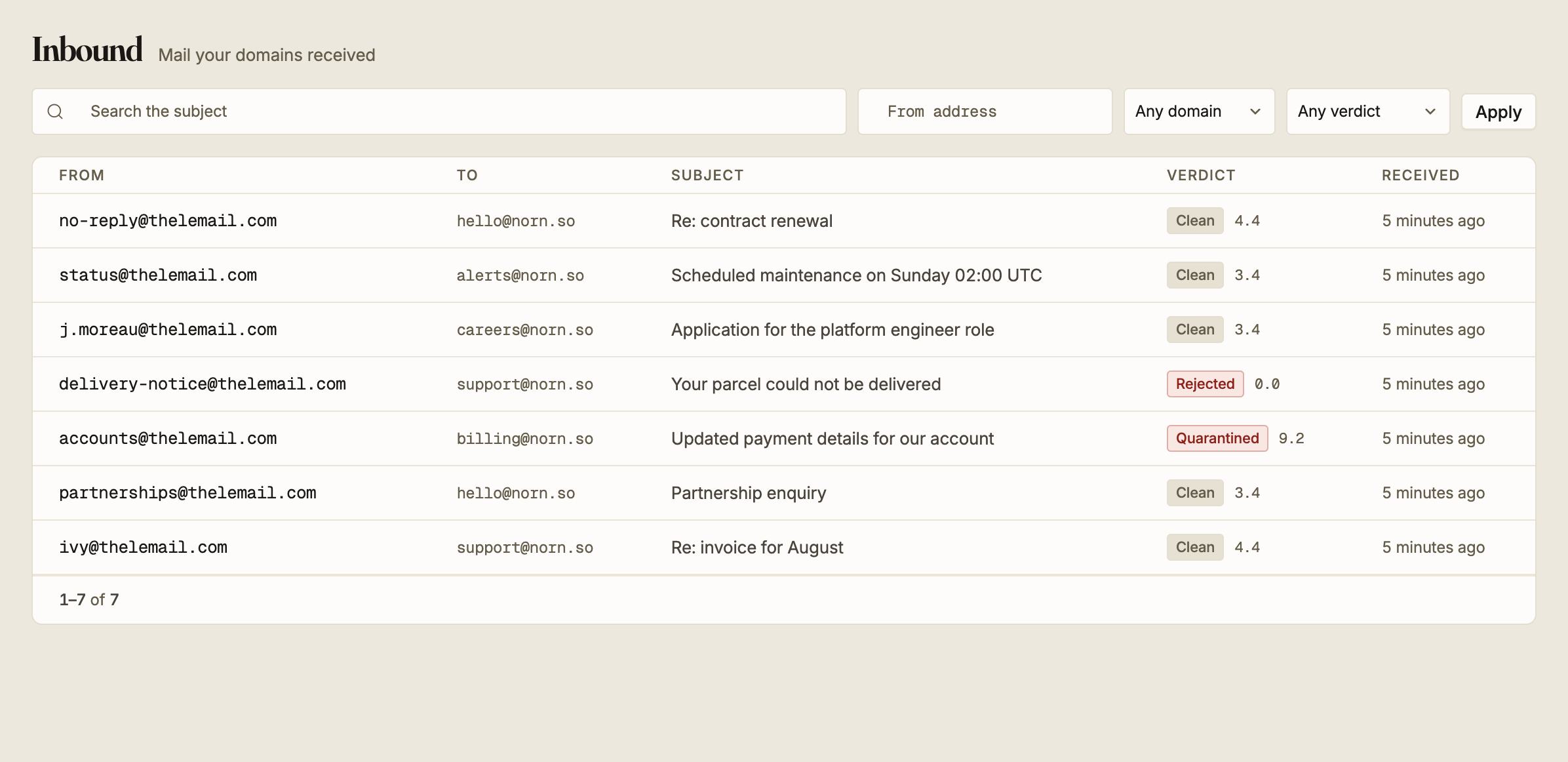
Each row is one message: who it came from, which of your addresses it was sent to, the subject, the spam verdict with its score, and when it arrived.
From, Subject and Received are sortable. Received, newest first, is the default.
Four filters sit above the list, and they apply together when you press Apply:
| Filter | What it matches |
|---|---|
| Search the subject | Any part of the subject line, ignoring case |
| From address | Any part of the sender address, ignoring case |
| Any domain | Which of your domains received it |
| Any verdict | The spam verdict below |
Because both text filters match on a fragment, @thelemail.com in From address finds
everything from that sender's domain without needing the full address.
Spam verdicts
Every message is checked before it is stored, and the verdict is what the filter concluded about it.
| Verdict | What the filter concluded |
|---|---|
| Clean | Nothing suspicious |
| Flagged | High enough to mark, low enough to keep. A spam header was added |
| Subject marked | Keep it, with the subject rewritten to warn the reader |
| Deferred | Refuse it for now, so the sender tries again later |
| Quarantined | Hold it here instead of delivering it |
| Rejected | Refuse it outright |
| Discarded | Accept it and then drop it silently |
Quarantined is the only verdict you can act on, and it is covered below.
Score and symbols
Open a message to see the score and the individual rules behind it.
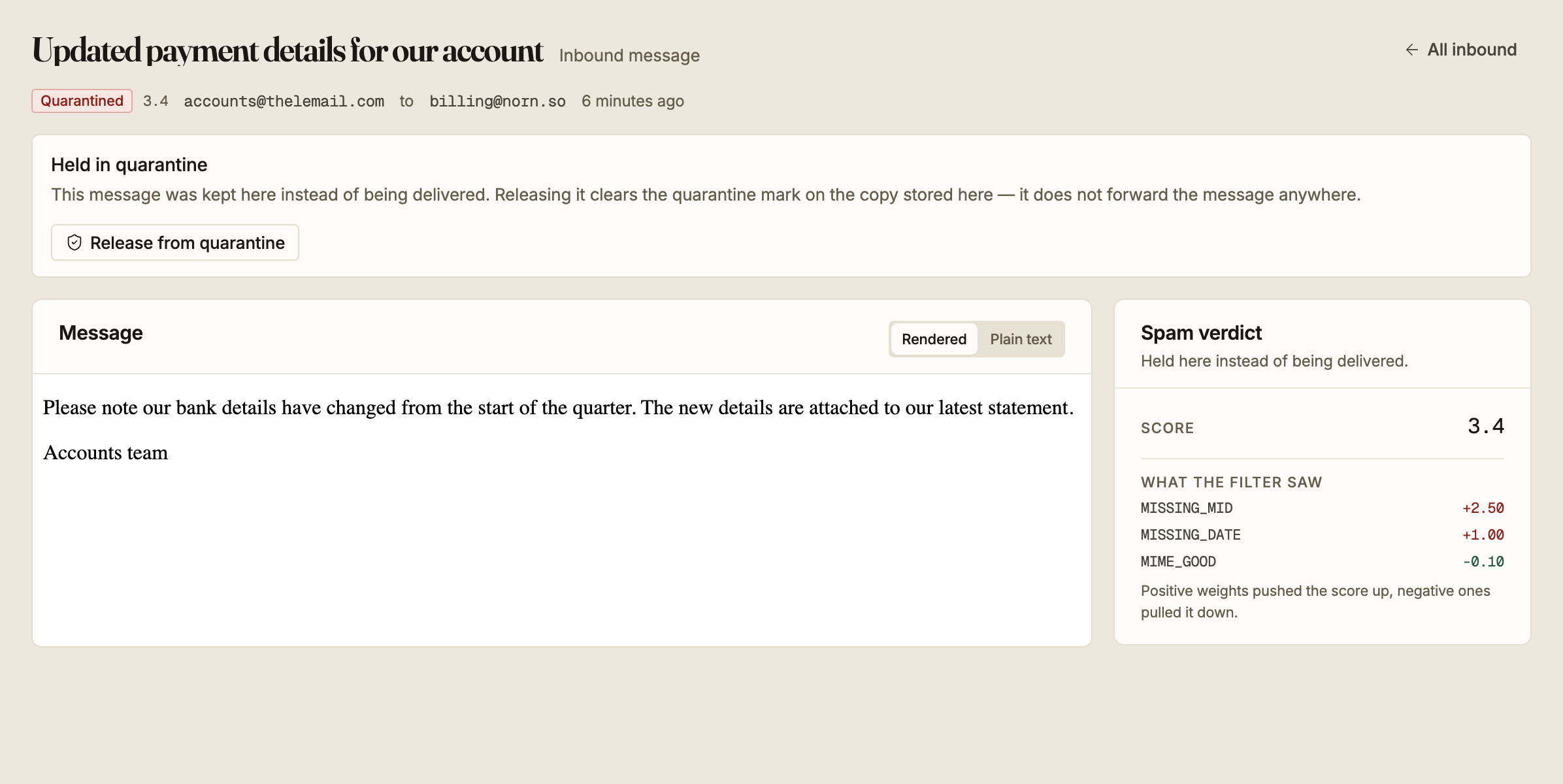
What the filter saw lists the rules that moved the score, heaviest first. Positive weights pushed the score up and negative ones pulled it down, so a message can pick up several small penalties and still come out clean.
The score and the verdict are separate readings. A message can carry a decisive verdict on a score of zero, so read the verdict first and treat the score as the explanation rather than as the decision.
If the filter could not be reached when a message arrived, the message is stored as Clean with a score of zero and no rules recorded. That is the behaviour you want, since a filter outage should not lose your mail, but it does mean a Clean verdict with no rules listed is worth a second look.
Releasing from quarantine
A quarantined message is held rather than delivered, and the screen offers Release from quarantine.
Releasing does not deliver or forward anything. It clears the quarantine mark on the copy stored here and nothing else. No message is sent on to a mailbox, and the original sender is not contacted.
Use it to record that you looked at a held message and found it legitimate.
Releasing changes the verdict to Clean, and it cannot be undone from this screen. The score and the rules that produced it stay on the record, so you can still see why the message was held in the first place.
Releasing a message that is not in quarantine does nothing, and the screen says so rather than reporting a success.
Reading a message
Rendered shows the HTML part. Plain text shows the text part.
Inbound mail is untrusted by definition, so the rendered view runs with scripts disabled. A message can therefore look different here than it would in a mail client, which is the trade-off being made deliberately.
Not every message has both parts. If there is no HTML part, the rendered view says so and points you at plain text. If neither part was stored, the screen says that instead of showing an empty frame.
Stored message bodies are encrypted at rest.