API keys
An API key authenticates your own code against Epostix. Keys live under API Keys & SMTP, alongside the SMTP credentials that do the same job for anything that speaks SMTP rather than HTTP.
Creating a key
Create API key asks for five things.
A name, up to 80 characters. It is the only way to tell keys apart later, because the
token itself is masked. Name it after the thing that will hold it, not after yourself:
Production sending is useful in six months, new key is not.
An environment, live or test. This decides the token's prefix, tix_live_ or
tix_test_, so a key that has leaked into a log is identifiable at a glance.
Permissions, at least one:
| Scope | Grants |
|---|---|
| Send email | Submit messages through the API |
| Read email | Read messages, events and delivery status |
| Manage domains | Add, verify and configure domains |
| Manage contacts | Read and write audience data |
| Manage webhooks | Create and edit webhook endpoints |
| Read analytics | Read metrics and reports |
| Manage API keys | Create and revoke other keys |
Full access grants every scope, including future ones. The table above summarizes common permissions; authentication lists the full API scope names.
Manage API keys is the scope to think twice about. A key holding it can mint further keys with any scope, so it is not a limited key at all. Give it only to something that genuinely provisions credentials.
An expiry date is required. There is no non-expiring key, which is deliberate: a credential nobody ever rotates is one nobody ever notices has leaked.
An IP allow-list is optional. If set, requests from anywhere else are rejected, which turns a stolen token into a much smaller problem. Leave it empty if your sender's egress address is not stable, because a cloud provider rotating your address will otherwise take your sending down.
The token is shown once
When the key is created, the full token is displayed. That is the only time it is shown. Nothing on the screen, and nothing in the API, will reveal it again.
Store it before closing the dialog. If you lose it, delete the key and create another; there is no recovery path.
Reading the list
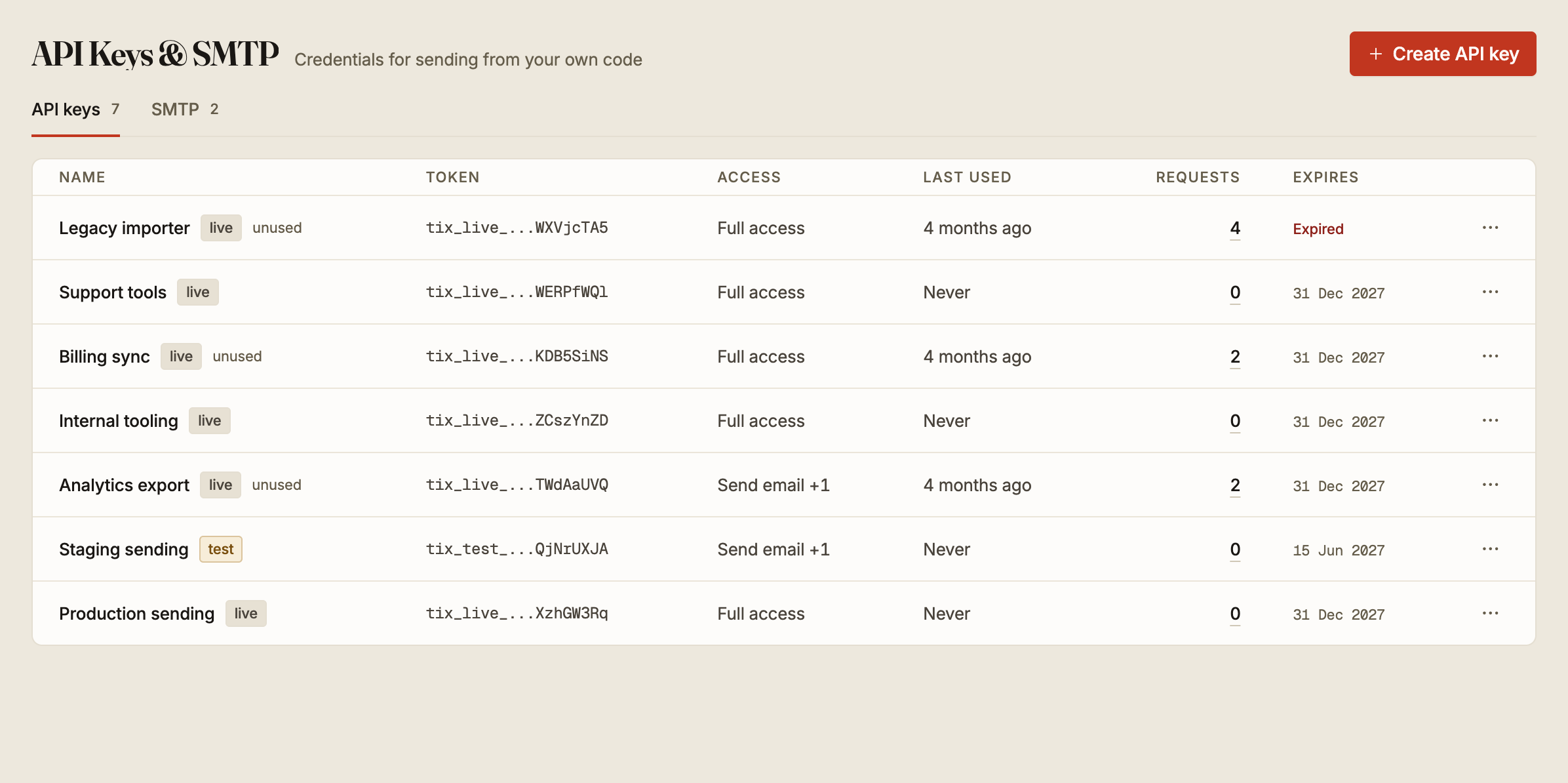
The list carries the things that tell you whether a key is still doing a job.
Token shows the prefix and last characters only, which is enough to match a key against one in your configuration.
Access summarises the scopes. Requests counts the calls made with it, and opens the usage log for that key.
Last used is the one to read first. Never on a key created weeks ago means it is not
wired to anything. A key marked unused has not been used in over 60 days.
Expires shows the date, or Expired once it passes. A key nearing its date is flagged
two weeks ahead, so an expiry does not arrive as an outage.
An expired key stops working. Nothing warns your code, so a key that expires at three in the morning fails then. Create the replacement, deploy it, then delete the old one, rather than letting the date do it for you.
When a key leaks
Delete it. There is no rotation for API keys and no grace period, because a leaked key is valid until it stops existing.
Revoke a leaked key promptly, then replace it in the applications that used it. For planned rotation of a key that has not leaked, create and deploy the replacement before revoking the old one.
A key committed to a repository is leaked even after the commit is removed, since the history usually survives somewhere. Treat any key that has ever been in a repository, a build log or a support ticket as public.